HTTP(S) WEBSITE MONITORING
Monitor the website signals that tell you to investigate
When a homepage, storefront, or booking page returns an unexpected result, you need evidence to start checking what changed. ostr.io provides HTTP(S) website monitoring with setup presented as one-click.
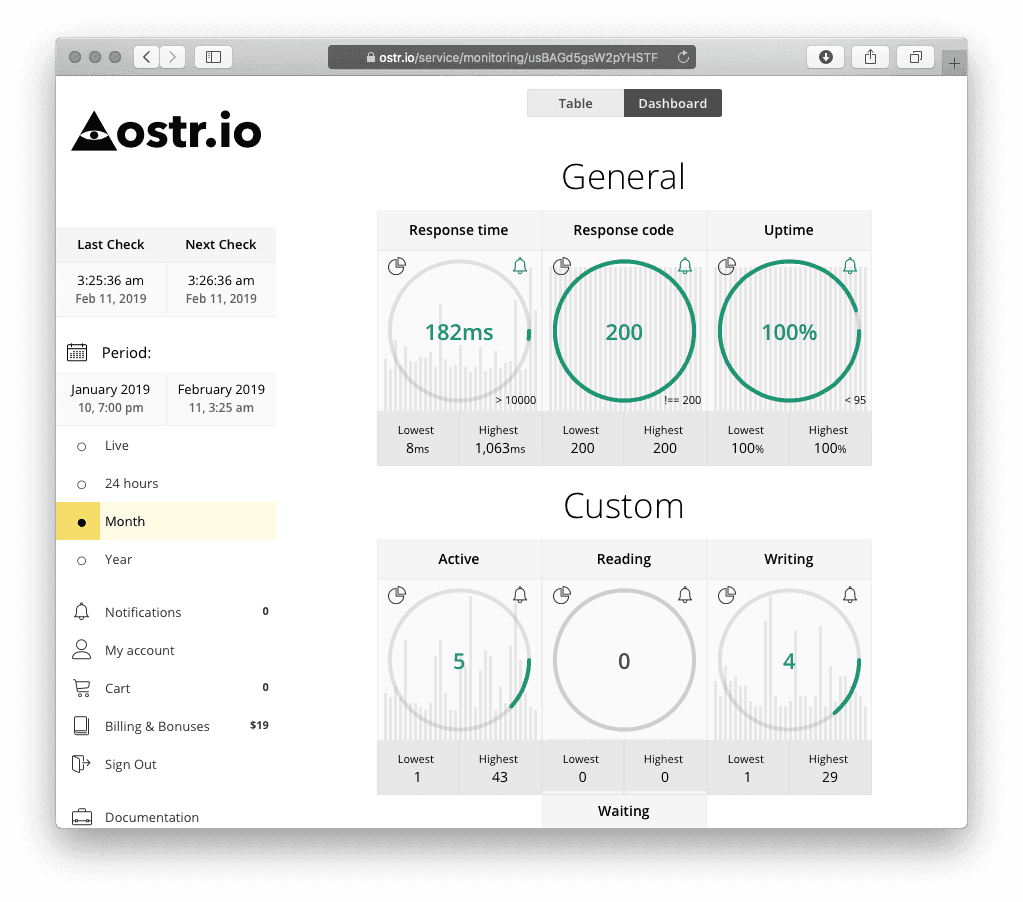
HTTP(S) coverage
Signals HTTP(S) monitoring can cover
HTTP(S) website monitoring checks how a website's public pages respond and records when that behavior changes, so a responsible person can investigate. ostr.io provides HTTP(S) monitoring for signals such as the following:
- HTTP response code - see whether an endpoint returns the expected result instead of an error or redirect loop.
- Response time - identify responses slow enough to be worth investigating.
- Uptime percentage - review reported availability history rather than relying on memory.
- Content changes - find unexpected changes in page output, such as a blank template or a defaced section.
Content-Typechanges - notice a changed response header where supported, which can hint at a misconfiguration.
These signals indicate that a review is needed. They do not establish the cause on their own, and that distinction keeps monitoring honest: it shows you what changed and when, so the right person can determine why.
In plain English, HTTP(S) website monitoring is a recurring check of how a public URL responds. It is most useful when you define the expected result first: the status should be successful, the page should load within an acceptable range, the important content should still be present, and the response headers should match what the site normally serves. When one of those expectations changes, the alert gives you a timestamped starting point for investigation.
business impact
Website reachability, email delivery, and customer trust all sit behind these signals.
Which pages to monitor first
Monitor the pages where a failure becomes visible to customers. A signal is most useful when the expected result is written down before the first alert arrives.
| Endpoint | Expected result | First place to check |
|---|---|---|
| Homepage | Successful page response | Hosting, CDN, recent edits |
| Lead or contact form | Expected status and content | Form provider, app release |
| Checkout or booking | Expected status and timing | Payment, booking, or app provider |
| Login | Reachable sign-in page | Auth provider, recent deploy |
Notice how often hosting and CDN head that last column. For most sites the response a check actually receives is produced by a delivery layer in front of the application, so a caching or routing change there can move a status code or a timing figure without anyone editing the site. Writing down which platform sits in front of your pages, and who has access to it, is what makes that first check quick. Bridge CDN is one such delivery platform, from the same company as ostr.io and currently in development.
owner checklist
Assets, providers, recipients, and escalation routes are written down first.
Why these signals matter for a small business
A small-business site can appear online while delivering an error page, an incorrect response, or unexpected content. A storefront that loads but returns a broken checkout still loses sales; a booking page that times out still loses appointments. Monitoring gives you a recorded signal to compare against deployments, hosting changes, DNS configuration, third-party services, or recent site edits.
Treat monitoring history as a starting point, not a replacement for your provider's logs. The most useful questions are simple: what did the public endpoint return, when did that change, and who owns the next system to inspect? Answering those three quickly is usually the difference between a short interruption and a long one.
Combine website checks with domain monitoring when registration, DNS, or certificate signals are also important to how your site and email operate.
Example response workflow
- Receive a website monitoring alert and note the time it was reported.
- Confirm the affected URL and the specific signal - status code, timing, or content/header change.
- Check recent publishing, deployment, hosting, CDN, or DNS changes that line up with the timing.
- Escalate to the responsible technical provider when the cause is outside your control.
- Record the outcome and adjust recipients or monitoring setup so the next alert is even clearer.
Alerts and usage
ostr.io supports email and SMS notifications, and a contact list can include multiple recipients. Assign people who can inspect website operation and contact hosting or DNS providers where necessary. HTTP(S) monitoring follows ostr.io's usage-based pricing; review current pricing for usage terms before you commit to a monitoring footprint.
Pair website monitoring with domain signals
Many website problems do not start on the website at all. A page that suddenly fails to load, or a browser security warning where there was none, often traces back to the domain layer - a DNS record that changed, a certificate that lapsed, or a registration that was edited. When you watch website behavior alongside domain monitoring, DNS monitoring, SSL/TLS monitoring, and domain expiration monitoring, an HTTP(S) signal arrives with the context that usually explains it. That combination turns a vague "the site is broken" into a specific, answerable question about which layer changed and when.
For most small businesses the practical setup is simple: HTTP(S) checks on the customer-facing pages, plus the free WebSec domain signals running quietly in the background. The website checks tell you something looks wrong; the domain signals frequently tell you why.
HTTP(S)
Status, timing, output, and Content-Type checks.
WEBSEC
WHOIS, DNS, SSL/TLS, and renewal reminders.
ROUTE
Email and SMS routes for people who can investigate.
Frequently asked questions
What is HTTP(S) website monitoring?
HTTP(S) website monitoring checks how a public URL responds and alerts assigned recipients when response status, timing, content, or supported header signals differ from the expected result.
Does HTTP(S) monitoring explain the root cause automatically?
No. It reports monitored website behavior such as response status, timing, or content and header changes. You or your provider still investigate the cause.
Should every URL on a site be monitored?
Usually no. Start with customer-facing pages and endpoints where a wrong response affects sales, leads, bookings, support, or trust, then expand.
How does this connect to domain monitoring?
Website monitoring shows public response behavior. Domain monitoring adds WHOIS, DNS, SSL/TLS, and expiration context that often helps explain a change.
What happens when a check looks abnormal?
ostr.io records the signal and notifies the recipients you assigned, by email and SMS, so a responsible person can review it.
Which website monitoring signals should small businesses start with?
Start with response code and response time on the homepage and revenue or lead paths. Add content and Content-Type checks when page output integrity matters.
Start with ostr.io
Set up HTTP(S) monitoring, choose responsible recipients, and use unexpected signals as a prompt to investigate.
domain-protection.info is an official monitoring information property by ostr.io. About this site